As businesses grow, their technology needs become more complex. A process that worked well with spreadsheets, email, and off-the-shelf applications a few years ago may eventually become slow, difficult to manage, or expensive to maintain. When that happens, the problem is often not the people or the process—it is the limitations of the software supporting the business.
This is where custom software can make a significant difference.
Custom software is designed around the specific requirements, workflows, users, and goals of a business. Instead of forcing employees to adapt their work to a generic application, custom software allows technology to adapt to the way the business actually operates.
However, not every business needs a custom application. Developing software from the ground up requires investment, planning, maintenance, and technical expertise. The important question is therefore not simply whether custom software is available, but whether your business has reached the point where it makes strategic sense.
There are several clear signs your business needs custom software. These include repetitive manual work, disconnected systems, growing operational costs, poor scalability, reporting limitations, security concerns, and software that no longer fits the company’s workflow.
Businesses exploring technology modernization can also review IT and technology resources to better understand how software development and digital solutions can support changing operational requirements.
This guide explores the most important indicators that it may be time to move beyond generic software and consider a solution designed specifically for your organization.
What Is Custom Software?
Custom software is an application or digital system developed specifically for a particular business, industry, workflow, or group of users.
Unlike ready-made software, which is built for a broad market, custom software is created around specific business requirements.
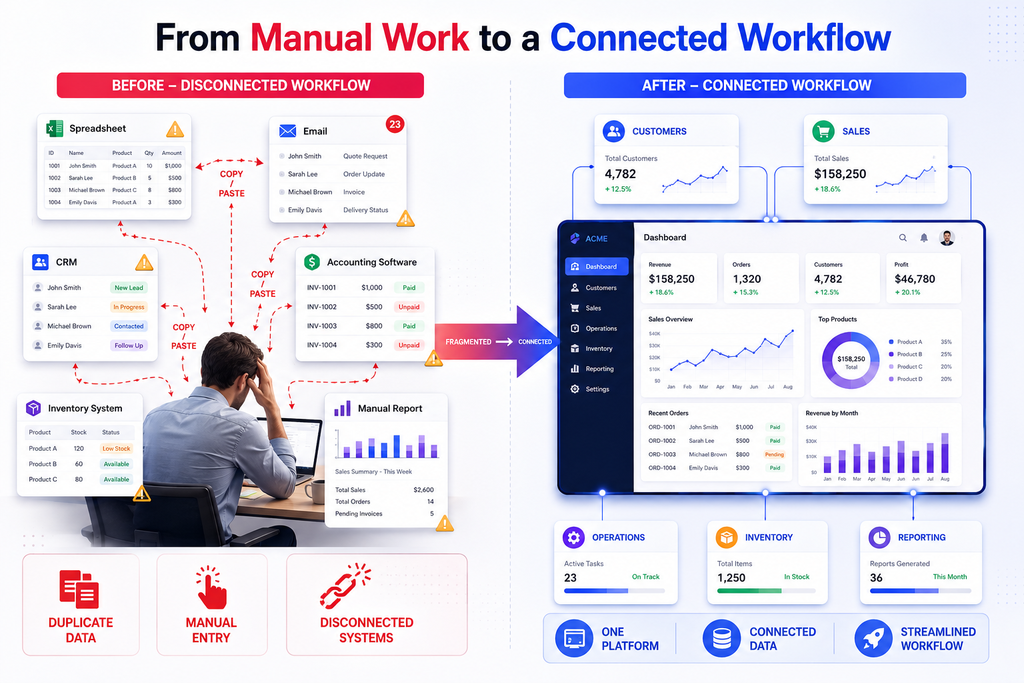
For example, a company may need a platform that combines:
- Customer management
- Order processing
- Employee workflows
- Inventory tracking
- Automated notifications
- Business reporting
- Payment processing
- Role-based access
- Third-party integrations
A generic application might provide some of these features, but employees may still need spreadsheets, emails, or additional applications to complete the process.
Custom software can bring these functions together into one connected environment.
According to the National Institute of Standards and Technology (NIST), organizations should consider security throughout technology development and implementation. This is particularly important when businesses are developing systems that handle customer information, financial records, employee data, or other sensitive information.
10 Signs Your Business Needs Custom Software
1. Your Team Relies Heavily on Manual Processes
One of the strongest signs your business needs custom software is excessive manual work.
If employees regularly copy information between spreadsheets, applications, emails, and documents, your organization may be losing valuable time.
For example, consider a sales team that receives an inquiry through a website. An employee may need to:
- Copy the customer’s information into a spreadsheet.
- Enter the same information into a CRM.
- Send a confirmation email manually.
- Notify another department through chat.
- Update the status in another application.
- Create a report at the end of the week.
Each individual task may appear small. However, when hundreds or thousands of transactions occur, the total amount of wasted time can become significant.
Custom software can consolidate these processes and automate repetitive actions while keeping employees in control of important decisions.
Why manual processes become expensive
Manual workflows can lead to:
- Data-entry mistakes
- Duplicate information
- Delayed responses
- Increased administrative costs
- Difficult reporting
- Employee frustration
- Inconsistent processes
If your employees spend more time managing information than using it to make decisions, it may be time to reconsider your software strategy.
2. Your Business Uses Too Many Disconnected Applications
Using multiple software applications is not necessarily a problem. The issue occurs when those applications cannot communicate effectively.
A growing organization might use separate platforms for accounting, sales, inventory, customer support, communication, project management, and reporting.
When systems operate independently, employees may need to move information manually from one platform to another.
This creates what is often called a data silo.
For example, the sales team may have customer information in one system while the support team maintains a completely different database. Management may then rely on spreadsheets to combine the information.
A custom business application can connect important workflows into a unified system.
Instead of asking employees to work around disconnected software, the organization can build a central platform that integrates the most important business functions.
3. Off-the-Shelf Software Does Not Match Your Workflow
Generic software is designed to serve many businesses. As a result, it may include features you never use while missing functions that are essential to your operations.
This can create a difficult situation.
Employees may start creating workarounds to compensate for missing features. They might use spreadsheets, browser extensions, manual checklists, or separate databases.
Over time, these workarounds can become part of the business process.
When customization becomes the better option
Consider custom development when:
- Your workflow is significantly different from industry standards.
- Employees regularly request features that existing software does not provide.
- Important business processes require workarounds.
- Your team pays for many unused features.
- Existing software limits how your company operates.
The goal is not to build software simply because customization is possible. The goal is to build technology when a tailored solution can provide measurable operational value.
4. Your Existing Software Cannot Scale With Business Growth
Software that works for a small business may not work efficiently when the company grows.
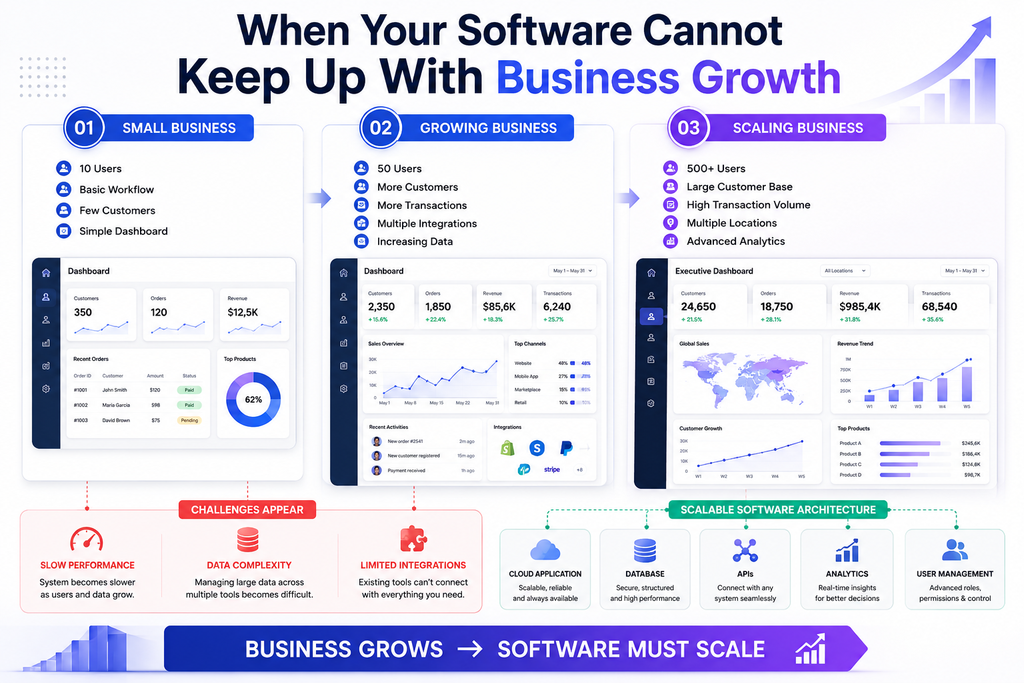
More customers can mean:
- More transactions
- More employees
- More data
- More integrations
- More locations
- More complex permissions
- Higher reporting requirements
If your current system becomes slower or increasingly difficult to manage as your business grows, scalability may be becoming a serious concern.
A custom application can be architected around expected growth.
For example, developers can consider database architecture, application performance, authentication, APIs, cloud infrastructure, caching, and monitoring during the planning stage.
The AWS Well-Architected Framework provides useful guidance around building reliable, secure, efficient, and scalable systems.
A scalable software strategy allows technology to support growth rather than become a bottleneck.
5. Reporting and Business Insights Are Difficult to Obtain
Modern businesses depend heavily on data.
Management needs answers to questions such as:
- Which products generate the most revenue?
- Where are customers dropping out of the sales process?
- Which operational process takes the most time?
- Which employees or teams require additional resources?
- How has performance changed over time?
- Which customers generate the highest long-term value?
If answering these questions requires manually combining multiple spreadsheets and applications, your reporting infrastructure may not be sufficient.
Custom software can be designed with reporting and analytics from the beginning.
Instead of collecting information first and trying to organize it later, the system can structure data around the metrics that matter most to the organization.
This can make dashboards, reports, filters, and performance tracking much more useful.
6. Your Business Has Unique Rules or Complex Workflows
Some organizations operate according to processes that are too specific for generic applications.
For example, a business may have unique:
- Approval workflows
- Pricing rules
- Customer categories
- Employee permissions
- Inventory procedures
- Compliance requirements
- Billing models
- Service processes
Trying to force these rules into a generic application can make daily operations unnecessarily complicated.
Custom software can encode business logic directly into the system.
For instance, instead of asking an employee to remember which approval is required for a particular transaction, the application can automatically identify the correct approval workflow.
This reduces unnecessary decision-making and creates more consistent processes.
7. Security and Access Control Are Becoming More Important
As businesses grow, security requirements usually become more sophisticated.
A company may need different employees to access different information. For example, a finance employee may require access to billing information, while a customer support employee may only need access to customer service records.
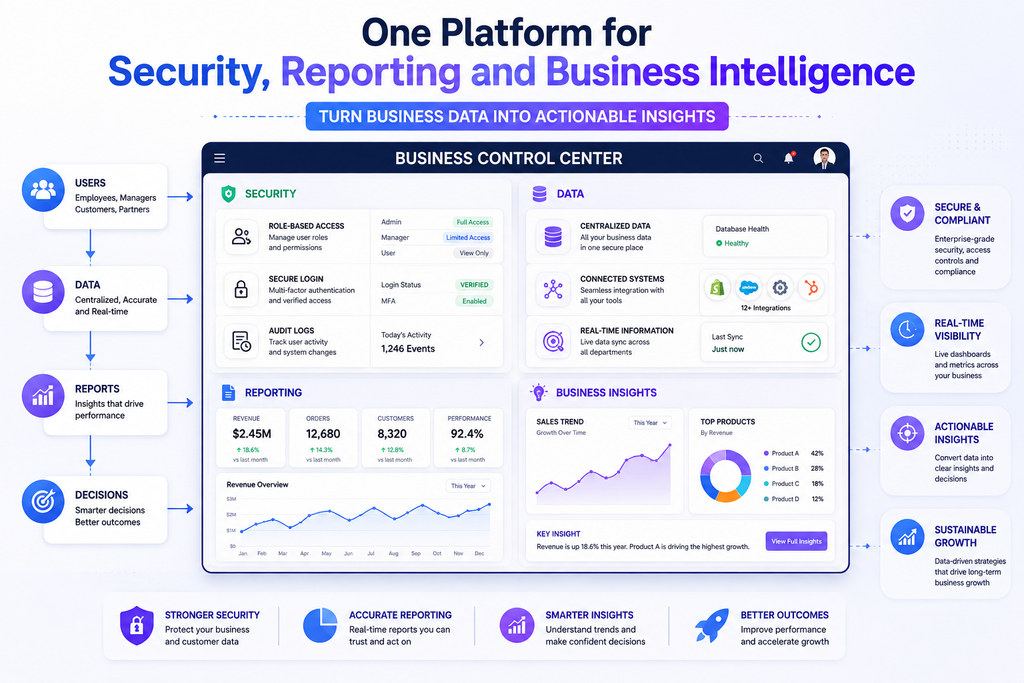
Custom software can be designed with specific access-control requirements, including:
- Role-based permissions
- Authentication
- Authorization
- Audit logs
- Secure APIs
- Data encryption
- Session management
- Administrative controls
Security should not be treated as something added at the end of development. It should be considered during architecture, development, testing, deployment, and maintenance.
The OWASP Foundation provides widely used security resources for developers and organizations building modern web applications.
For businesses handling sensitive data, this approach can be particularly important.
8. Employees Are Constantly Complaining About Your Software
Employee feedback can reveal technology problems that management may not immediately see.
If employees frequently say things such as:
“There are too many steps.”
“I have to enter this information twice.”
“The system does not support this process.”
“I have to maintain another spreadsheet.”
“It takes too long to find customer information.”
these may be signs that the software is creating unnecessary friction.
Technology should help employees perform their jobs more efficiently.
When software becomes an obstacle, productivity decreases and employees may create unofficial workarounds.
Therefore, employee feedback should be considered when evaluating whether a custom application is justified.
9. Your Software Costs Keep Increasing
Software subscriptions can appear inexpensive when viewed individually.
However, a growing organization may eventually pay for:
- Multiple SaaS subscriptions
- Additional users
- Premium features
- Integration services
- Data storage
- Separate reporting tools
- Third-party automation services
- Custom plugins
The total cost can become substantial.
This does not automatically mean custom software will be cheaper. Building and maintaining software also requires investment.
However, businesses should evaluate total cost of ownership, not simply monthly subscription prices.
A custom solution may become strategically attractive when it replaces several disconnected systems and reduces operational inefficiencies.
The decision should consider development costs, maintenance, infrastructure, security, employee productivity, licensing, and long-term scalability.
10. Your Business Needs a Competitive Advantage
Sometimes the strongest reason for custom software is not fixing a problem—it is creating something competitors cannot easily replicate.
Software can become part of a company’s competitive strategy.
For example, a business could develop a proprietary platform that provides:
- Faster customer onboarding
- A unique customer experience
- Specialized analytics
- Industry-specific workflows
- Faster order processing
- Personalized services
- Internal operational advantages
When technology directly supports a unique business capability, it becomes more than an operational expense.
It can become a strategic asset.
Custom Software vs. Off-the-Shelf Software
The decision between custom and ready-made software should be based on business requirements.
| Factor | Off-the-Shelf Software | Custom Software |
|---|---|---|
| Initial setup | Usually faster | Requires planning and development |
| Customization | Often limited | Highly flexible |
| Development cost | Usually lower initially | Higher initial investment |
| Scalability | Depends on provider | Designed around requirements |
| Workflow support | General-purpose | Business-specific |
| Integrations | Available options | Can be developed specifically |
| Ownership | Usually subscription-based | Greater control over solution |
| Maintenance | Vendor-managed | Requires ongoing management |
| Competitive differentiation | Limited | Potentially high |
For businesses with simple and standardized requirements, existing software may remain the best choice.
For businesses with specialized processes, significant growth, or complex integrations, custom development can provide greater long-term value.
How to Decide If Custom Software Is Worth the Investment
Before starting development, businesses should conduct a structured assessment.
Identify the Core Problem
Start by documenting the problem rather than immediately discussing features.
Ask:
- What is currently inefficient?
- How much time does the problem consume?
- How frequently does it occur?
- Does it affect customers?
- Does it create security or compliance risks?
- Does it limit business growth?
A clear problem statement provides a stronger foundation for development.
Calculate the Business Impact
Estimate the current cost of the problem.
For example, if 10 employees spend one hour each day performing repetitive data-entry tasks, the annual labor cost can become significant.
Also consider indirect costs such as:
- Lost productivity
- Customer delays
- Errors
- Missed opportunities
- Management overhead
This gives decision-makers a more realistic understanding of the potential return on investment.
Define the Minimum Viable Product
A common mistake is trying to build everything at once.
Instead, identify the essential functions required to solve the primary business problem.
An initial custom application might include:
- User authentication
- Core workflow
- Database
- Dashboard
- Essential integrations
- Basic reporting
- Administrative controls
Additional features can be introduced after users provide feedback.
This approach can reduce unnecessary development costs and improve adoption.
What Does the Custom Software Development Process Look Like?
A successful project normally follows several stages.
1. Discovery and Requirements
Business requirements, user needs, workflows, and technical constraints are identified.
2. UX and UI Design
The team creates user flows, wireframes, interfaces, and prototypes before development begins.
3. Architecture and Development
Developers build the application, database, APIs, integrations, and core functionality.
4. Testing
The application is tested for functionality, performance, usability, compatibility, and security.
5. Deployment
The software is released to its intended environment, such as a cloud platform or internal infrastructure.
6. Maintenance and Improvement
After launch, the application requires monitoring, security updates, bug fixes, and feature improvements.
A reliable software development partner should therefore think beyond the initial launch and consider the complete lifecycle of the application.
Businesses evaluating custom application development can explore technology development resources and services through this technology-focused resource when comparing possible approaches to software modernization.
Common Mistakes to Avoid When Building Custom Software
Custom software can deliver significant value, but poor planning can turn a promising project into an expensive one.
Avoid these common mistakes:
Building Without Clear Requirements
Unclear requirements often result in scope changes, delays, and unnecessary features.
Ignoring End Users
Software should be designed around the people who actually use it.
Focusing Only on Appearance
A modern interface is important, but usability, performance, security, and reliability are equally important.
Underestimating Maintenance
Software is not a one-time project. It requires updates, monitoring, security improvements, and technical support.
Trying to Build Everything at Once
Start with the highest-value functionality and expand based on real-world feedback.
Neglecting Security
Security should be integrated into the architecture and development process instead of being treated as a final checklist.
Benefits of Choosing Custom Software at the Right Time
When the business case is strong, custom software can provide several long-term benefits.
Better Operational Efficiency
Automating repetitive workflows can reduce manual effort and allow employees to focus on higher-value work.
Improved User Experience
Applications can be designed around the exact needs of employees and customers.
Greater Scalability
The technology architecture can be planned around current requirements and future growth.
Better Data Visibility
Centralized data and customized reporting can help management make better decisions.
Flexible Integrations
Custom APIs and integrations can connect systems that would otherwise operate independently.
Stronger Competitive Differentiation
A proprietary software platform can support processes and experiences that generic products may not provide.
Final Thoughts: Is It Time for Custom Software?
The signs your business needs custom software usually become visible when technology starts limiting the organization rather than supporting it.
If your team spends too much time on manual processes, works across disconnected applications, struggles with reporting, depends on spreadsheets, faces scalability problems, or cannot find software that fits its workflows, it may be time to evaluate a custom solution.
However, custom software should not be selected simply because it sounds more advanced. The decision should be based on measurable business requirements, expected return on investment, scalability, security, user needs, and long-term strategy.
The best software solution is the one that solves the right business problem at the right time.
For some organizations, an existing SaaS platform will remain the most practical choice. For others, custom software can transform inefficient processes into streamlined digital workflows and create a foundation for sustainable growth.
Ultimately, recognizing the signs your business needs custom software is the first step. The next step is understanding your processes, defining your requirements, and choosing a development approach that can turn those requirements into a reliable, scalable, and valuable technology solution.